LI:
To see and understand the connection between the written code, the block code and the flow chart.
This is the comparison between the Python coding, the blocks and the flowchart for making the Microbit act like a dice

LI:
To see and understand the connection between the written code, the block code and the flow chart.
This is the comparison between the Python coding, the blocks and the flowchart for making the Microbit act like a dice
0 Learning Intentions
To understand how flowcharts relate to coding blocks.
To understand how to get the microbit to talk to another microbit using radio signals.
Here is my flowchart practice document.

LI:To learn to code the microbot in python
This first one shows the Python coding for a flashing heart. It flashes between a small heart icon and a large heart icon. The main thing to notice between the Python coding and the blocks is that the forever loop is at the top and bottom of the content in both.


LI:To learn how to code microbots to play rock paper sizzors and understond how to use a flow chart.
Link To DLO

Learning Intention - To understand how the mBot is put together so that I can fix it when something goes wrong.
Today, we took an mBot apart and then reassembled it. We then tested it with some code to make sure that it worked correctly.
Here are the parts of the mBot that I took apart.


LI: to code a robot to try and make it move forward and back withoutb touching it
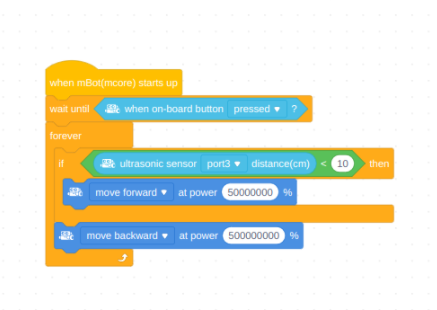
My robot will wait until i have pressed the onboard button before it does anything. We used an "IF - THEN - ELSE" block as this gives the robot two choices of things to do. We are using the ULTRASONIC SENSORon the of the robot and we need to sense if something 10cm in front of it. IF something is 10cm or LESS in front of the robot , it will move backwards. IF something is NOT less han 10cm in the front of the robot, it wil move forwards (ELSE). This is all put into a forever block so that the robot constantly senses what is in front of it
